
|
Tab |
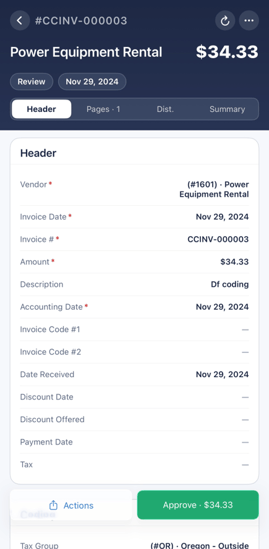
What it shows |
|
Header |
Vendor, invoice number, invoice date, amount, accounting date, invoice codes, discount and payment dates, and tax. Tap the edit button to change any field. |
|
Pages |
The image of the document. Pinch to zoom and swipe through multiple pages. |
|
Dist. |
A read-only summary of how the amount is split. Tap + Add to start the Distribution wizard. Tap any row to edit it. |
|
Summary |
Comments and the full workflow History for the item, plus the action bar. |
|
💡 Tip | From any invoice detail, tap the menu in the top-right to draw on the image, highlight, generate a PDF with details and history, or share via email or text message. |